> ## Documentation Index
> Fetch the complete documentation index at: https://help.comdesk.com/llms.txt
> Use this file to discover all available pages before exploring further.
# MobileClient ログイン方法
MobileClientのログイン方法をご説明します。
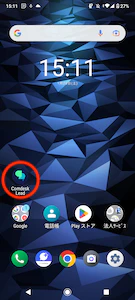
1. MobileClientアプリを立ち上げます。\\
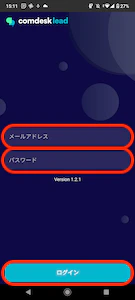
2. Comdesk Leadでログインしているユーザーと同様のID・パスワードを入力し、ログインしてください。\
※スペースなどの不要な文字があると、ログイン後、操作に不具合が生じる場合がございます。\
必ずID・パスワードをお間違えないようご入力ください。\\
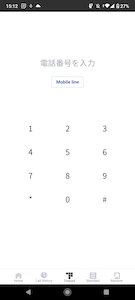
3. 正しくログインができると画像の画面に切り替わります。\\
その他ご不明点などございましたら、[**サポートチームまでお問い合わせ**](#contact)をお願いいたします。
 2. Comdesk Leadでログインしているユーザーと同様のID・パスワードを入力し、ログインしてください。\
※スペースなどの不要な文字があると、ログイン後、操作に不具合が生じる場合がございます。\
必ずID・パスワードをお間違えないようご入力ください。\\
2. Comdesk Leadでログインしているユーザーと同様のID・パスワードを入力し、ログインしてください。\
※スペースなどの不要な文字があると、ログイン後、操作に不具合が生じる場合がございます。\
必ずID・パスワードをお間違えないようご入力ください。\\
 3. 正しくログインができると画像の画面に切り替わります。\\
 その他ご不明点などございましたら、[**サポートチームまでお問い合わせ**](#contact)をお願いいたします。