> ## Documentation Index
> Fetch the complete documentation index at: https://help.comdesk.com/llms.txt
> Use this file to discover all available pages before exploring further.

# 携帯回線発信制御アプリ（CallServer）のログイン・ログアウト

## **CallServerとは**

**携帯電話発信を制御するモバイルアプリ**

\*\*「CallServer」\*\*はComdesk Lead上の架電操作を本アプリで受けて、携帯端末から発信させます。

携帯を使用する際、必須となりますので、必ずインストールし、業務開始前にログインするようにしてください。

※本記事は、端末機種：DIGNO BX 　／　Androidバージョン： 9　の環境条件の画面でご案内しております。\
機種やバージョンによって表記等、異なる場合がございます。ご了承ください。

目次\
1\. CallServerへログインする\
2\. CallServerからログアウトする

## **1. CallServerへログインする**

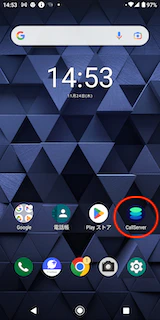
1. CallServerアイコンをタップします。
   <img src="https://mintcdn.com/comdesk/bh7YpWZjOWK9T4Nq/.gitbook/assets/12744354427033_0.png?fit=max&auto=format&n=bh7YpWZjOWK9T4Nq&q=85&s=fcb12ac8039c391267c94567ba477daf" alt="Screenshot_20221124-145303.png" width="160" height="320" data-path=".gitbook/assets/12744354427033_0.png" />
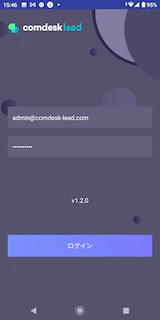
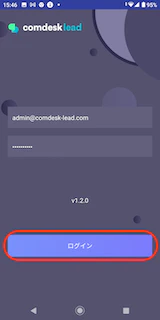
2. ログイン画面が表示されますので、メールアドレスとパスワードを入力し、ログインボタンをタップします。
   <img src="https://mintcdn.com/comdesk/bh7YpWZjOWK9T4Nq/.gitbook/assets/12744354427033_1.png?fit=max&auto=format&n=bh7YpWZjOWK9T4Nq&q=85&s=38bd3e58990ebe3f866d259a4e930698" alt="Screenshot_20221124-154625__2_.png" width="160" height="320" data-path=".gitbook/assets/12744354427033_1.png" />
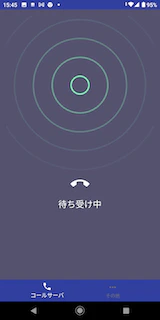
3. 「待ち受け中」画面に遷移します。

   <img src="https://mintcdn.com/comdesk/bh7YpWZjOWK9T4Nq/.gitbook/assets/12744354427033_2.png?fit=max&auto=format&n=bh7YpWZjOWK9T4Nq&q=85&s=7c80639268e7938cdf0dd5dfc660c003" alt="Screenshot_20221124-154532.png" width="160" height="320" data-path=".gitbook/assets/12744354427033_2.png" />

## **2. CallServerからログアウトする**

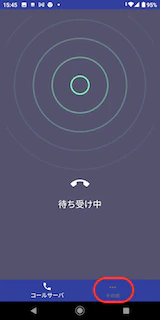
1. 「その他」をタップします。
   <img src="https://mintcdn.com/comdesk/bh7YpWZjOWK9T4Nq/.gitbook/assets/12744354427033_3.png?fit=max&auto=format&n=bh7YpWZjOWK9T4Nq&q=85&s=804b293c8d6fd53e856051541bd1a317" alt="NewScreenshot_20221124-154532__1_.png" width="160" height="320" data-path=".gitbook/assets/12744354427033_3.png" />
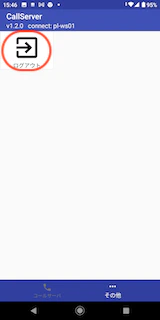
2. 「ログアウト」をタップします。

   <img src="https://mintcdn.com/comdesk/bh7YpWZjOWK9T4Nq/.gitbook/assets/12744354427033_4.png?fit=max&auto=format&n=bh7YpWZjOWK9T4Nq&q=85&s=25f290d0530ef0f895c5835985c95fa9" alt="Screenshot_20221124-154603.png" width="160" height="320" data-path=".gitbook/assets/12744354427033_4.png" />
3. ログイン画面に遷移します。ログアウト完了です。

   <img src="https://mintcdn.com/comdesk/bh7YpWZjOWK9T4Nq/.gitbook/assets/12744354427033_5.png?fit=max&auto=format&n=bh7YpWZjOWK9T4Nq&q=85&s=ca25c09992e32238b8094b2c427a9a7c" alt="Screenshot_20221124-154625__1_.png" width="160" height="320" data-path=".gitbook/assets/12744354427033_5.png" />

その他ご不明点などございましたら、[**サポートチームまでお問い合わせ**](#contact)をお願い致します。