> ## Documentation Index
> Fetch the complete documentation index at: https://help.comdesk.com/llms.txt
> Use this file to discover all available pages before exploring further.

# 通話後録音をOFFにする

## **概要**

スマートフォンの電話アプリの設定で、通話後録音をONに設定するとオートコールモードがご利用いただけません。

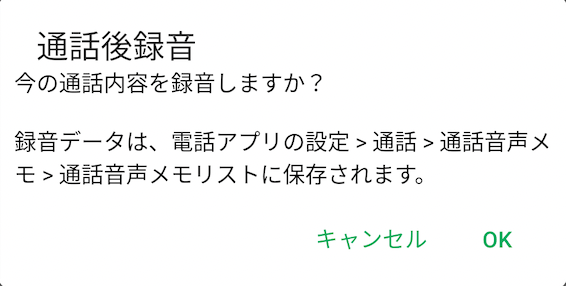
終話するたびに下図のメッセージが表示される場合は、通話後録音をOFFに設定してください。
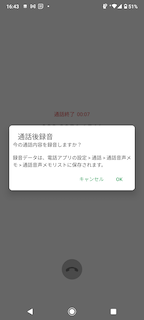
<img src="https://mintcdn.com/comdesk/qhh9B034wN4BUu9D/.gitbook/assets/12884976793369_0.png?fit=max&auto=format&n=qhh9B034wN4BUu9D&q=85&s=7247069d88b8d50b331d5c8b02ee73e7" alt="_________MSG.png" width="144" height="320" data-path=".gitbook/assets/12884976793369_0.png" />

<img src="https://mintcdn.com/comdesk/qhh9B034wN4BUu9D/.gitbook/assets/12884976793369_1.png?fit=max&auto=format&n=qhh9B034wN4BUu9D&q=85&s=a7878889592cd32cce45112df9cbb8ef" alt="____MSG.png" width="566" height="286" data-path=".gitbook/assets/12884976793369_1.png" />

## **設定方法**

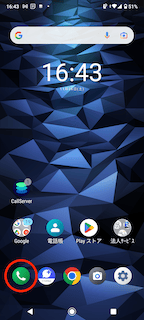
1. &#x20;電話アプリをタップします。\\
   <img src="https://mintcdn.com/comdesk/qhh9B034wN4BUu9D/.gitbook/assets/12884976793369_2.png?fit=max&auto=format&n=qhh9B034wN4BUu9D&q=85&s=b677a8c5088ec165f708079f1417a06a" alt="_______________.png" width="144" height="320" data-path=".gitbook/assets/12884976793369_2.png" />
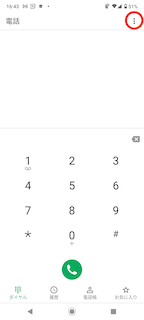
2. 右上の「︙」をタップします。\\
   <img src="https://mintcdn.com/comdesk/qhh9B034wN4BUu9D/.gitbook/assets/12884976793369_3.png?fit=max&auto=format&n=qhh9B034wN4BUu9D&q=85&s=16348dda121a039c22d14a6611570efe" alt="______________.png" width="144" height="320" data-path=".gitbook/assets/12884976793369_3.png" />
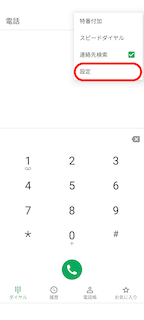
3. メニューが表示されますので、「設定」をタップします。\\
   <img src="https://mintcdn.com/comdesk/qhh9B034wN4BUu9D/.gitbook/assets/12884976793369_4.png?fit=max&auto=format&n=qhh9B034wN4BUu9D&q=85&s=506320a1f53336df85abc2192c3e4dd3" alt="___2___________menu.png" width="144" height="320" data-path=".gitbook/assets/12884976793369_4.png" />
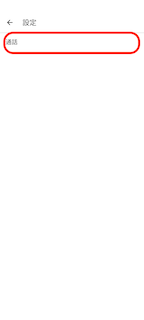
4. 「通話」をタップします。

   <img src="https://mintcdn.com/comdesk/qhh9B034wN4BUu9D/.gitbook/assets/12884976793369_5.png?fit=max&auto=format&n=qhh9B034wN4BUu9D&q=85&s=79e917e1d314a0e95e59ba892bfab6a8" alt="3________.png" width="144" height="320" data-path=".gitbook/assets/12884976793369_5.png" />
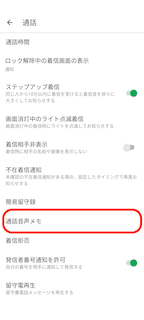
5. 「通話音声メモ」をタップします。\\
   <img src="https://mintcdn.com/comdesk/qhh9B034wN4BUu9D/.gitbook/assets/12884976793369_6.png?fit=max&auto=format&n=qhh9B034wN4BUu9D&q=85&s=8c3b10818dfb686bedff4aea1390f38b" alt="__________________.png" width="144" height="320" data-path=".gitbook/assets/12884976793369_6.png" />
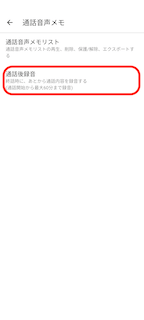
6. 「通話後録音」をタップします。\\
   <img src="https://mintcdn.com/comdesk/qhh9B034wN4BUu9D/.gitbook/assets/12884976793369_7.png?fit=max&auto=format&n=qhh9B034wN4BUu9D&q=85&s=ab8db9e302f8e37b870d90c03b7e38ff" alt="_______________.png" width="144" height="320" data-path=".gitbook/assets/12884976793369_7.png" />
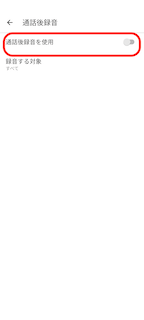
7. 「通話後録音を使用」をOFFにします。\\
   <img src="https://mintcdn.com/comdesk/qhh9B034wN4BUu9D/.gitbook/assets/12884976793369_8.png?fit=max&auto=format&n=qhh9B034wN4BUu9D&q=85&s=3564cc3283c2d378d97823a658cac7d4" alt="_________________.png" width="144" height="320" data-path=".gitbook/assets/12884976793369_8.png" />

その他ご不明点などございましたら、[**サポートチームまでお問い合わせ**](#contact)をお願い致します。